


.webp)

Ask any sales engineer where their week goes and part of the answer is always the same. RFPs. Security questionnaires. The 200-line spreadsheet that lands on a Friday with a Tuesday deadline. The AE owns the deal, but the hard technical and security questions land on you. Every time.
The team at 1up ran their own rundown of RFP tools worth a look, and it got us thinking about the same list from a presales seat. So we pulled together six RFP automation tools SEs actually run into, grouped by what they do, with honest notes on where each one fits and where it does not. Every one of them has added real generative AI since 2024, so the differences now come down to where the answers come from and how much upkeep they need.
The Six at a Glance

The RFP-native automation tools
These are built for one job: answering RFPs and questionnaires fast.
Loopio
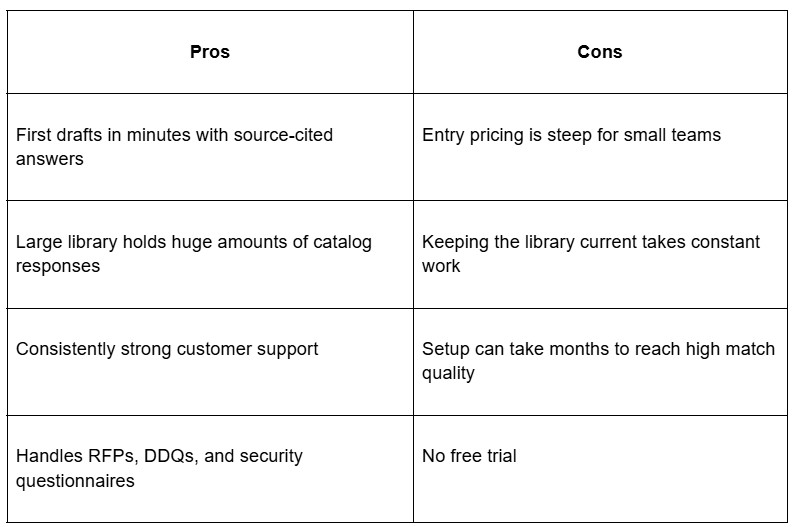
Loopio is one of the names you hear most in RFP circles. It works as a content library, so your team stores approved answers and reuses them across Word, Excel, PDF, and web portals. In 2026 the AI got a rebrand and a real upgrade. What used to be Magic AI is now Response Intelligence, trained on more than half a million past projects, and it drafts first responses with trust scores that cite the source so you can check each answer. There is also a Project Agent that redrafts a response in a different tone with one click.
The catch is still upkeep. Response Intelligence only works as well as the library behind it, so answers go stale, products change, and old content turns into wrong content before anyone notices. Loopio now covers RFPs, DDQs, and security questionnaires, and it pulls in Salesforce for opportunity context. If you want a deeper look at how it stacks up against other options, 1up put together a comparison of Loopio and its competitors.

Loopio key points

Loopio pros and cons
Best for: mid-size and larger teams with someone to own the content library.
Pricing: not published. Third-party 2026 estimates put the entry Foundations plan at more than $10,000 per year, scaling by seats and add-ons from there. No free trial.
1up
1up takes a different route from the library tools. Instead of asking you to build and maintain a bank of answers, it connects straight to your existing source material, your website, Google Drive, Confluence, and wherever else the truth lives, then pulls answers from it in seconds. It links back to the source so you can check the work, which matters a lot when one wrong security answer can sink a deal.
For SEs, the part that lands is where the answers show up. Your reps can ask a question right inside Slack, MS Teams, or Google Chat and get a response without leaving the channel. Long Word docs and Excel sheets get filled automatically. There is even a browser extension that answers questions inside web portals when there is no doc to upload. Beyond RFPs, 1up also handles security questionnaires and DDQs, and its Answer Hub gives customers a self-serve place to get answers from your approved sources, with a human looped in when needed. Here’s how 1up does this:
Video: https://player.vimeo.com/video/882460794
Companies like FusionAuth, WalkMe, and Deliveroo use it to automate their questionnaires. It also holds up well against Responsive, the incumbent most SEs already know.

1up key points

1up pros and cons

Best for: presales and sales teams that want answers fast without running a library.
Pricing: 1up publishes its rates, which is rare in this category. There is a free plan with 50 answers a month, plus a 14-day free trial on paid tiers. Paid plans run $300 a month for Starter (one questionnaire type) and $900 a month for Plus (six questionnaires), with Enterprise custom. Annual billing saves 15 percent.
Ombud
Ombud has grown past being just an RFP tool. It now bills itself as an enterprise RevOps and knowledge platform, handling RFPs, RFIs, security questionnaires, proactive proposals, SOWs, and even POC frameworks in one place. Teams share files, collaborate with comments and task assignments, and lean on AI to surface approved answers.
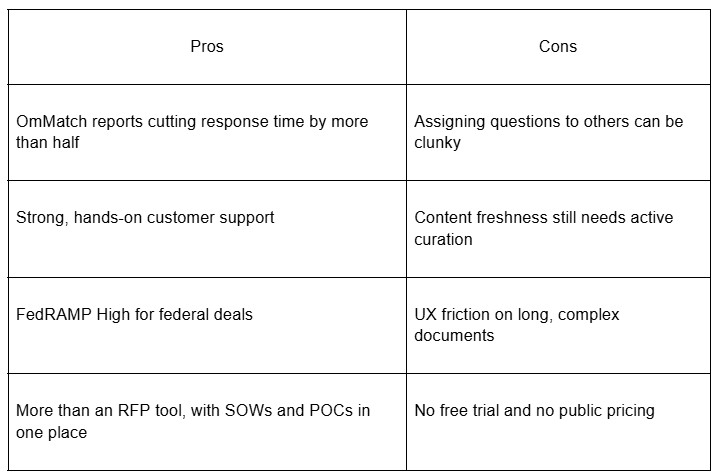
The AI side runs on two named features. OmMatch is a content-matching engine that suggests answers and that reviewers credit with cutting response time by more than half. Ombuddies are context-aware assistants that help draft and autofill. Ombud also carries FedRAMP High authorization, which matters if you sell to US federal agencies. It runs light enough for a small team to manage, though assigning questions to the right person can still get fiddly, and there is no free trial.

Ombud key points

Ombud pros and cons
Best for: enterprise RevOps and presales teams that want RFPs, SOWs, and POCs in one platform.
Pricing: not published. Fully custom, scaling with team size, response volume, integrations, and onboarding. No free trial.
Proposal management with RFP muscle
These lean toward proposals and pitch documents, with RFP response as part of the package.
QorusDocs
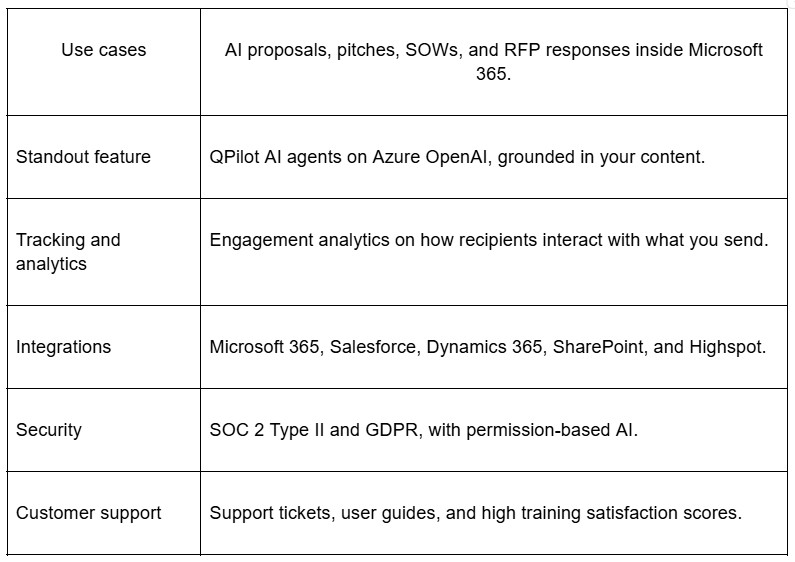
QorusDocs lives inside Microsoft 365, so if your company runs on Word, PowerPoint, and Outlook, it slots into the tools your team already opens every day. It covers proposals, pitches, statements of work, and RFP responses. The platform has leaned on AI since 2020, and its assistant QPilot, built on Azure OpenAI, now works through specialized agents for proposals, pitches, SOWs, and RFP responses.
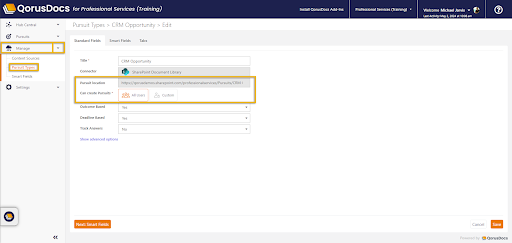
The AI is grounded in your approved content library rather than the open internet, and it outputs native Word and PowerPoint files instead of raw text you have to format. Newer additions include bid/no-bid scoring, built-in ROI calculators, and a Pursuits workspace for cross-team collaboration. The trade-off is still setting it up. Onboarding takes longer than people expect, and the interface has a learning curve you should plan for.
QorusDocs key points
QorusDocs pros and cons

Best for: Microsoft-heavy shops that need proposals and RFPs in one place.
Pricing: not published. Every package includes QPilot, M365 integration, a governed content library, CRM integration, analytics, and enterprise security. Demo and sales call required.
Qvidian
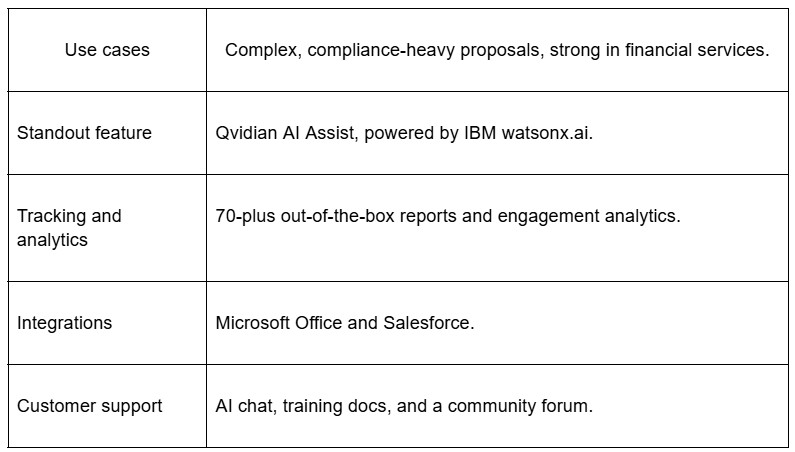
Qvidian, now part of Upland Software, has been in the proposal game a long time and shows up most in financial services. It handles large, complex, compliance-heavy documents, the kind full of technical jargon that would take a person days. Its generative AI feature, Qvidian AI Assist, runs on IBM watsonx.ai and can analyze an RFP for go/no-go decisions in minutes, rewrite library content for tone and length, and draft fresh answers from your existing library.
A couple of things to weigh. AI Assist is an optional add-on with an extra fee rather than something baked into every plan, and while the interface improved after a refresh, some reviewers still find it dated and the content-update process slow. Qvidian does not store or train on your data. For other tools in the same lane, 1up has a Qvidian comparison as well.

Qvidian key points
Qvidian pros and cons

Best for: financial services and other regulated teams handling dense, technical RFPs.
Pricing: not published. Contact Upland for a quote, and note that AI Assist is a paid add-on.
Broader sales enablement that touches RFPs
Not a pure RFP tool, but worth knowing if content organization is the bigger problem.
Seismic
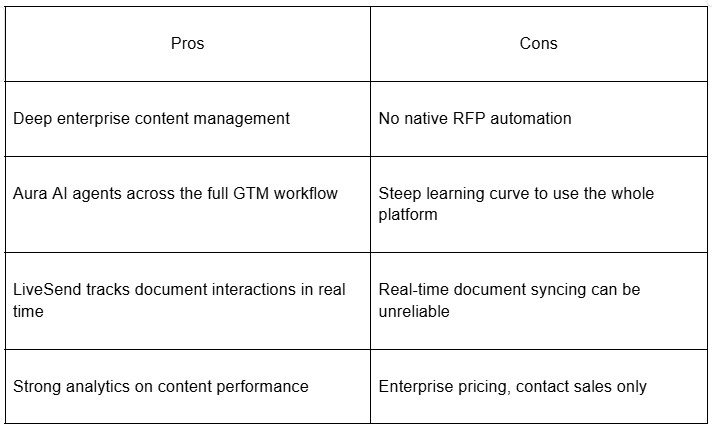
Seismic is a sales enablement platform first, the enterprise standard alongside Highspot and Showpad. It stores and organizes your content, powers personalized buyer microsites, and trains reps, which makes it strong for client-facing teams that present a lot. Its AI layer, Aura, launched in 2024 and has expanded fast.
Through the Winter and Spring 2026 releases, Seismic pushed Aura into a full set of agents, nine of them covering analytics, meetings, presentations, roleplay, search, and more, plus a Page Builder that spins up interactive sales pages from a prompt. It also added support for Model Context Protocol, so outside AI tools can plug in and share context. The thing to know for RFPs: Seismic still has no native RFP automation. It works as the layer around your content, not the engine that answers questionnaires, so if that is your main pain, this is not the fix. There is also a lot to learn.

Seismic key points

Seismic pros and cons
Best for: enablement-led teams that present often and want content organized. Not the pick if RFP automation is your core need.
Pricing: not published. Contact sales.
How to pick the one that fits
No single tool wins for everyone here, and that is kind of the point. The right RFP automation software depends on how your team actually works, not on whose feature list is longest. A solo SE juggling demos and security reviews needs something fast and low-maintenance. A 40-person bid team in financial services needs depth and compliance features that would be overkill anywhere else.
Every tool on this list now runs generative AI, so the real question is not whether it has AI. It is where the answers come from. Library tools are only as accurate as the content you maintain. Source-connected tools pull from your live docs. That difference shows up fast when a security answer has to be right.
A few questions worth asking before you commit:
- How much content upkeep can your team realistically handle?
- Do you need answers inside Slack or Teams, or is a doc-based flow fine?
- Does it connect to where your knowledge already lives?
- Can you try it before you buy, or are you signing up blind?
The good news is you do not have to guess. Several of these offer a free trial or at least a demo, and 1up lets you see it in action before you decide. Try two or three that look close, run a real questionnaire through each, and see which one gives you answers you would actually send to a customer. That test tells you more than any comparison chart. Whatever you land on, the goal is to automate the RFP grind so you can get back to the parts of presales you signed up for.
